
Understanding Computer Accessories and Their Functionalities
– Title: Computer Accessories Explained: RAM, Processors, SSDs, Bytes & Bits
– Meta Description: Learn the basics of computer accessories and components like RAM sizes, Intel i3/i5/i7 vs AMD 5000 series, SSD storage, bytes, ASCII vs Unicode, and 32-bit vs 64-bit systems in this detailed guide.
– Focus Keyphrase: Computer Accessories Functionalities
– Category: Technology / Computer Basics
– Tags: RAM, Intel Processors, AMD 5000 Series, SSD, Bytes, ASCII, Unicode, Bits
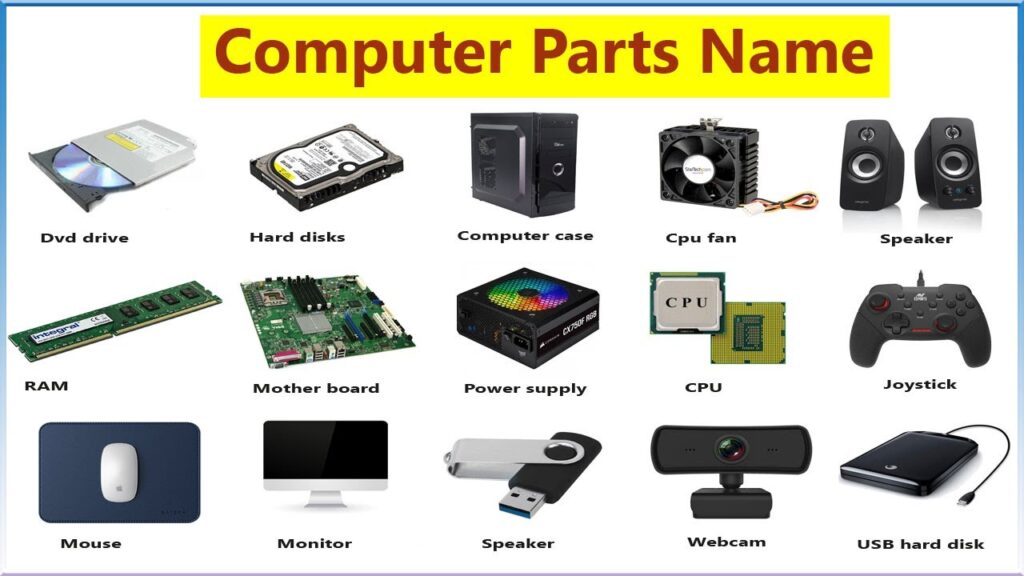
Computer Accessories Explained: RAM, Processors, SSDs, Bytes & Bits
Introduction
When buying or upgrading a computer, terms like RAM, SSD, i3/i5/i7 processors, AMD 5000 series, bytes, ASCII, Unicode, and 32-bit vs 64-bit systems often appear. For beginners, these can be confusing. This blog breaks down these accessories and functionalities in simple language, helping you understand what they mean and how they affect performance.
🔹 What is RAM?
RAM (Random Access Memory) is the temporary memory your computer uses to run applications. It stores data that the CPU needs immediately, making multitasking smoother.
– 4GB RAM: Suitable for basic tasks like browsing, emails, and word processing.
– 8GB RAM: Ideal for students, office work, and light gaming.
– 16GB RAM: Recommended for professionals, gamers, and heavy multitasking.
The more RAM you have, the faster your system can handle multiple applications simultaneously.
🔹 Intel i3, i5, i7 vs AMD 5000 Series
internal link keep learning more
Processors are the brain of your computer. Intel and AMD are the two leading brands.
– Intel i3: Entry-level, good for everyday tasks.
– Intel i5: Mid-range, balances performance and cost.
– Intel i7: High-performance, great for gaming, video editing, and professional work.
AMD 5000 Series processors are known for their efficiency and multitasking power. Compared to Intel, AMD often provides better value for money, especially in multi-core performance. For example, AMD Ryzen 5 competes with Intel i5, while Ryzen 7 rivals Intel i7.
🔹 SSD Storage: 256GB vs 512GB
SSD (Solid State Drive) is faster than traditional hard drives. It stores your operating system, applications, and files.
– 256GB SSD: Enough for light users who store documents and a few apps.
– 512GB SSD: Better for professionals, gamers, or those storing large files like videos and graphics.
SSDs improve boot speed, application loading, and overall system responsiveness.
🔹 Processor Speed in Nanoseconds
Processor speed is measured in clock cycles, often represented in nanoseconds. A nanosecond is one-billionth of a second. The faster the processor executes instructions per cycle, the better the performance. Modern AMD processors are optimized to handle billions of instructions per second, making them highly efficient for multitasking and gaming.
🔹 Bytes, ASCII, and Unicode
– Byte: A unit of digital information, typically 8 bits. One byte can represent a single character like “A.”
– ASCII (American Standard Code for Information Interchange): An older character encoding system that represents English letters, digits, and symbols using 7 or 8 bits.
– Unicode: A modern encoding system that supports characters from all languages, including Hindi, Chinese, Arabic, and emojis. Unicode ensures global compatibility across devices and platforms.
🔹 32-bit vs 64-bit Systems
The term bits refers to how a processor handles data.
– 32-bit systems: Can process 2³² memory addresses (around 4GB of RAM).
– 64-bit systems: Can process 2⁶⁴ memory addresses, allowing access to much larger memory (theoretically up to 16 exabytes).
Most modern computers run on 64-bit systems, enabling faster performance and support for more RAM.
Conclusion
Understanding these computer accessories and functionalities helps you make smarter decisions when buying or upgrading a system. Whether it’s choosing between Intel i5 and AMD Ryzen 5, deciding on 8GB vs 16GB RAM, or knowing why Unicode matters more than ASCII, these basics empower you to select the right configuration for your needs.
SEO Tip: Use keywords like RAM comparison, Intel vs AMD, SSD storage, Unicode vs ASCII, 64-bit systems naturally in your blog to improve search visibility.

Good
Very nice
Great
Best
Intelligent
Wonderful
Good
Good sir
Nice 👍👍👍👍👍👍
Best of luck
Great 👍